
HELP DOCUMENTATION

How to fix Zoom audio issues

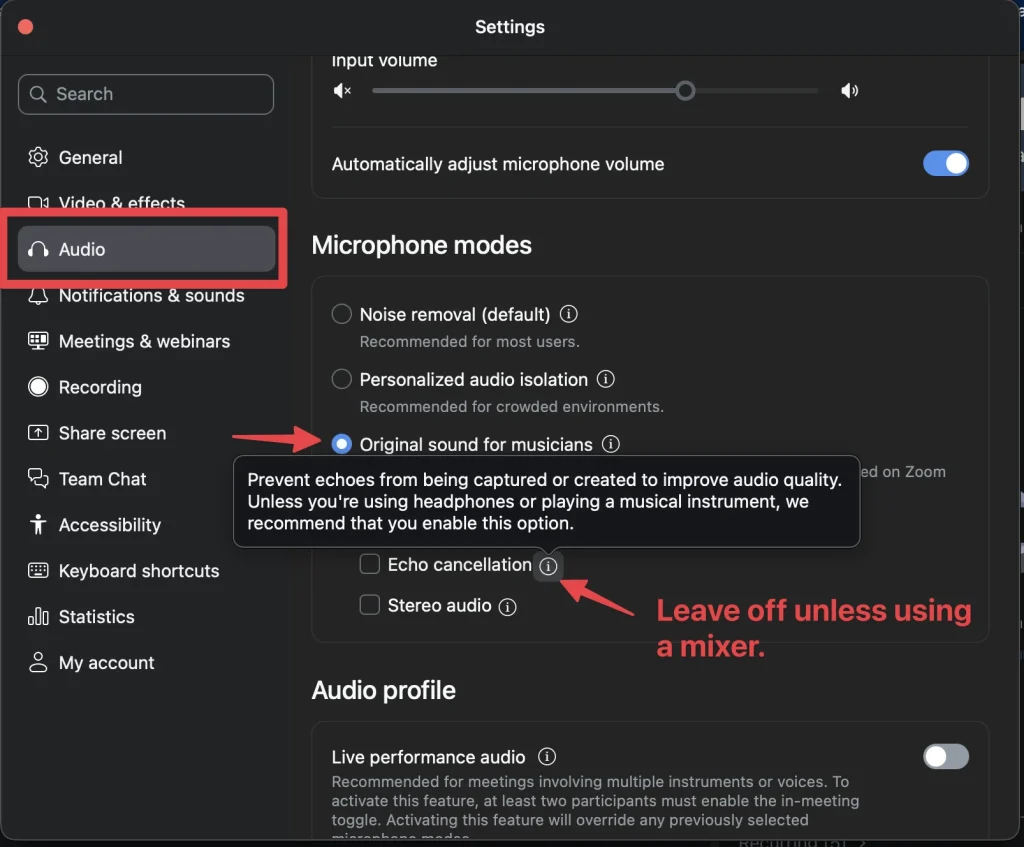
Some students have difficulty being clearly heard when playing piano during live Zoom sessions. This is usually caused by Zoom’s audio processing settings, which are designed for speech—not music. To ensure your full sound is heard, you should enable Original Sound for Musicians and adjust a few key audio settings.

Steps to Optimize Your Zoom Audio for Piano:

  1. Open Zoom and sign in to your account.
  2. Go to Settings by clicking on the gear icon in the upper right corner.
  3. Navigate to the Audio section.
  4. Under Music and Professional Audio, check Show in-meeting option to enable Original Sound.
  5. Turn ON High fidelity music mode.
  6. Turn ON Stereo audio (if available).
  7. Turn OFF Echo Cancellation. This setting is designed for speech and can cut off or distort piano sounds.
  8. When your meeting starts, click Original Sound for Musicians in the top left corner to activate it.

With these settings enabled, your piano will sound clearer, fuller, and more natural during your lesson.

How to fix Zoom audio issues

September 30, 2024 1194 views

Some students have difficulty being clearly heard when playing piano during live Zoom sessions. This is usually caused by Zoom’s audio processing settings, which are designed for speech—not music. To ensure your full sound is heard, you should enable Original Sound for Musicians and adjust a few key audio settings.

Steps to Optimize Your Zoom Audio for Piano:

  1. Open Zoom and sign in to your account.
  2. Go to Settings by clicking on the gear icon in the upper right corner.
  3. Navigate to the Audio section.
  4. Under Music and Professional Audio, check Show in-meeting option to enable Original Sound.
  5. Turn ON High fidelity music mode.
  6. Turn ON Stereo audio (if available).
  7. Turn OFF Echo Cancellation. This setting is designed for speech and can cut off or distort piano sounds.
  8. When your meeting starts, click Original Sound for Musicians in the top left corner to activate it.

With these settings enabled, your piano will sound clearer, fuller, and more natural during your lesson.

Was this helpful?

Average rating: 5.0 (1 ratings)
© Copyright  2024 - Jazzedge® - All Rights Reserved | Terms & Conditions

8.2.33